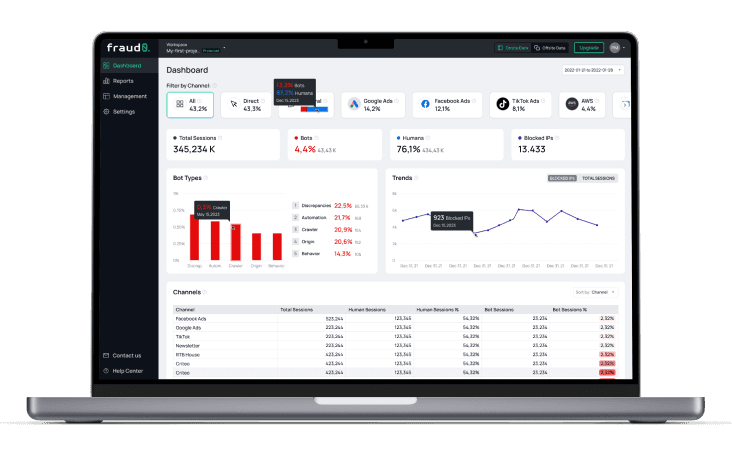
You're about to pay for a click fraud protection tool, and the category is loud. Every vendor promises to block bots, save budget, and clean up your campaigns. But the claims blur together, and the demos all look the same. Here's the context most pitches skip: in 2025, fraud0's Unmasking the Shadows report found 21.3% of all onsite traffic was invalid (search-engine crawlers excluded), across 1.2 billion sessions. More than a fifth of your visitors carry no business value. This guide cuts through the noise so you can buy the right protection for your situation, and know exactly what it can and can't do.
Key Takeaways
In 2025, fraud0's Unmasking the Shadows found 21.3% of onsite traffic invalid (search-engine crawlers excluded), so the problem these tools address is real and large.
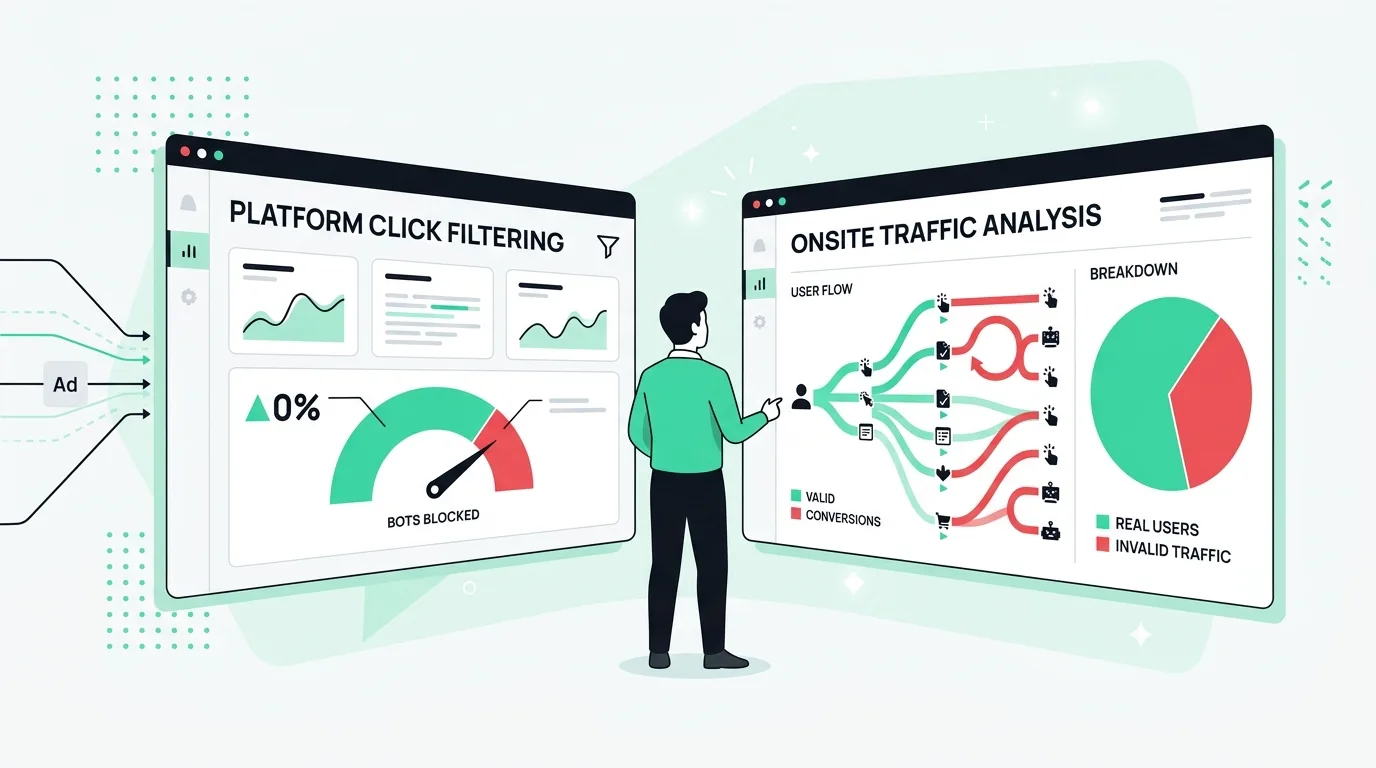
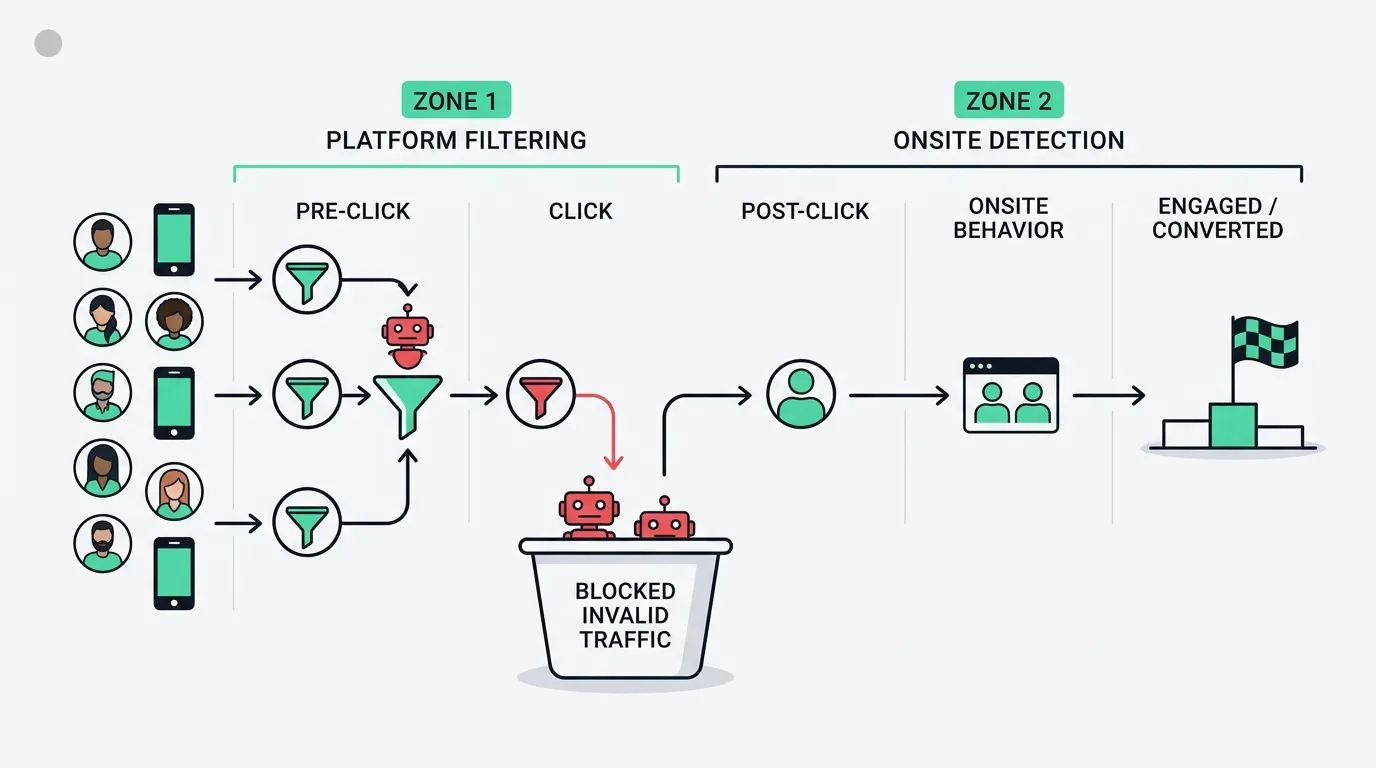
Click fraud protection has two layers: platform-level filtering (exclusion lists pushed back to Google, Meta, Microsoft) and onsite, first-party detection that sees what traffic does after the click. The strongest setups combine both.
No tool blocks 100% of invalid traffic. A brand-new bot's first click has no history to match, so some always slips through, which is why protection pairs with refunds, not replaces them.
When you compare tools, weigh detection method, channel coverage, data residency (GDPR), evidence/reporting, and pricing transparency, not just the dashboard.
Most buyers start this search after a gut feeling: the clicks are there, the customers aren't, and something looks off in the data. That instinct is usually right. The harder question is what to actually buy, because "click fraud protection," "click fraud software," and "PPC fraud detection" all describe an overlapping but uneven set of products. Some block IPs and call it a day. Others read behavior across channels and feed your campaigns. This guide is the map. We'll cover what these tools really do, the criteria that separate them, the honest limits of any of them, and where onsite detection fits alongside platform filtering. You want to recover wasted ad budget, and the right protection tool is one half of how you get there.
What is click fraud protection?
Click fraud protection is software that detects invalid clicks and excludes the sources behind them, so that more of your PPC budget reaches real people. In 2025, fraud0's Unmasking the Shadows report measured 21.3% of onsite traffic as invalid (search-engine crawlers excluded) and 21.2% of in-ad impressions invalid, so the waste sits on both sides of the click. Consequently, protection software is how you cut that drain going forward.
For wider context, Imperva's 2024 Bad Bot Report found automated bots made up 51% of all web traffic in 2024, so the raw volume of non-human activity hitting ads is substantial. The term gets used loosely, so let's be precise. Invalid traffic (IVT) is any ad interaction that doesn't come from a genuine, interested human, including bots, scripts, and accidental or fraudulent clicks. Meanwhile, PPC fraud refers to the deliberate generation of invalid clicks or conversions on pay-per-click ads to drain a competitor's budget or inflate a publisher's revenue. "Click fraud" is the literal product name and search term here, even though the wider category is better described as invalid traffic and ad fraud. Invalid clicks are just one symptom. The same tools increasingly tackle fake leads, bot conversions, and made-for-advertising placements, because they all stem from one problem: automated and non-human activity touching your ads.
In 2025, fraud0's Unmasking the Shadows report analyzed 1.2 billion onsite sessions and 10.78 billion ad impressions and found 21.3% of onsite traffic invalid (search-engine crawlers excluded) and 9.75% of conversions invalid. Specifically, click fraud protection software detects this invalid activity and excludes the sources behind it, reducing how much PPC budget reaches traffic that can't convert.
Here's the mechanism in plain terms. First, the software watches the traffic hitting your ads and your site, scores each visitor against signals that separate humans from bots, and builds exclusion lists of the sources that fail. Then those lists get pushed back into your ad accounts as IP exclusions and negative audiences. The next time a flagged source shows up, you don't pay for it.
Stop click fraud on Google Ads walks through that exclusion workflow on one platform, if you want the hands-on version of what protection software automates.
How does click fraud protection actually work?
Click fraud protection works in two layers, and the difference between them is the single most important thing to understand before you buy. In 2025, fraud0's Unmasking the Shadows report found that invalid activity persists even after standard platform filtering, with 21.3% of onsite traffic still invalid (search-engine crawlers excluded). That residual is precisely what onsite detection catches and platform filtering alone misses.
The first layer is platform-level filtering. Ad platforms run their own invalid-click detection, and protection tools extend it by feeding exclusion lists back into your accounts. This layer operates at the edge of the platform: it sees clicks, IPs, and basic signals, and it blocks known-bad sources before they cost you again.
The second layer is onsite, first-party detection. Bot detection is the practice of identifying automated, non-human traffic from behavioral and technical signals rather than from IP reputation alone. This layer sits on your own website and watches what each visitor does after the click. Because the platform's view ends once the user leaves for your site, onsite detection can read hundreds of signals that platform filtering never sees. In short, it is how you catch sophisticated activity that mimics a real click but behaves like a bot once it lands.
Click fraud protection operates in two layers. Platform-level filtering pushes exclusion lists back to ad platforms; onsite, first-party detection reads behavior after the click. In 2025, fraud0's Unmasking the Shadows report found invalid users were far shallower on average than real ones, the kind of post-click behavioral depth only onsite detection captures.
What signals separate a bot from a buyer?
Detection tools score visitors against signals, and the depth of those signals is what separates real protection from a glorified IP blocklist. In 2025, fraud0's Unmasking the Shadows report found invalid users averaged 1.2 page views and 26-second sessions, against 181 seconds for traffic overall. Behavioral patterns like that are far harder to fake than an IP address.
In our experience, the tools that lean only on IP reputation get beaten quickly, because IPs are cheap to rotate. For instance, a bot operator can cycle through thousands of addresses in an afternoon. What's much harder to disguise, however, is behavior: how the visitor moves, how long they stay, whether the device fingerprint is consistent, whether the session looks human or scripted. The more attributes a tool reads, the harder it is to fool.
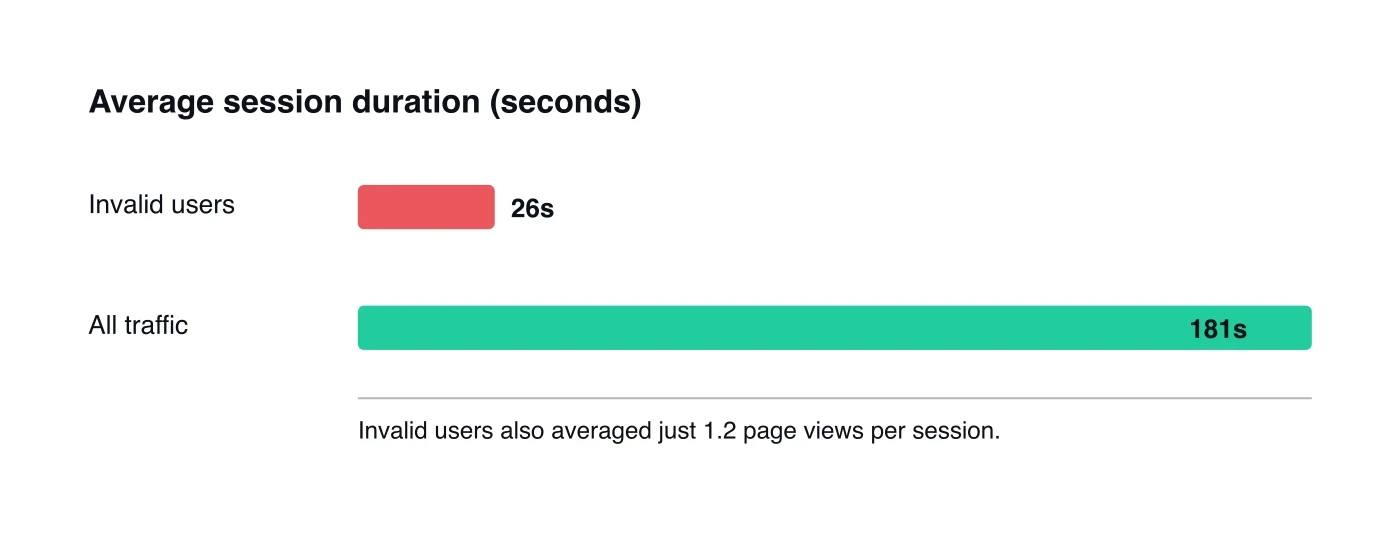
Source: fraud0, Unmasking the Shadows 2025
Where does the exclusion happen?
Detection is only half the job. The other half is exclusion: turning a flagged visitor into a source your campaigns stop paying for. Crucially, exclusion is built per platform, using each platform's own tag or pixel firing on your site, not one list that travels everywhere. Where a platform offers an audience-exclusion integration, the tool writes IP exclusions and a negative-audience list back into it. That covers Google Ads (a negative audience built via a tag, plus automatic IP exclusions), Meta (a custom audience populated through the Facebook pixel), Microsoft Advertising, DV360/CM360, and Criteo. Platforms without an audience-exclusion integration, such as TikTok and LinkedIn, are handled differently: the lever there is controlling whether that platform's tag or pixel fires for a flagged visitor, keeping them out of its retargeting and conversion data, plus IP-level signals and analytics hygiene.
The catch is timing. Exclusion only works on sources you've already seen and scored. A brand-new bot, on its very first click, has no history to match against, so it can't be pre-blocked. That single fact, importantly, shapes everything about how you should judge these tools, and we'll come back to it when we talk about limits.
What are the different types of click fraud software?
Click fraud software splits into a few distinct approaches, and they're not interchangeable. In 2025, fraud0's Unmasking the Shadows report found invalid traffic ranging from 20.6% on Paid Social to 7.0% on Paid Search, so a tool that only guards one channel leaves real exposure elsewhere. Matching the tool's scope to your media mix is the first filter.
The most basic category is the IP-blocking click blocker. These tools watch your Google Ads (and sometimes Microsoft) clicks, flag suspicious IPs, and auto-add them to your exclusion list. They're simple, cheap, and genuinely useful for the most obvious repeat offenders. Their weakness is depth: IPs rotate, and a blocker that reads little beyond the IP misses sophisticated activity.
The next category is cross-channel PPC protection. These tools cover multiple platforms (Google, Meta, Microsoft, TikTok) rather than one, and they typically read more signals than a pure IP blocker. They suit advertisers running paid spend across several channels who don't want three separate blind spots.
The third category is onsite, first-party detection with recovery. This approach adds a layer on your own site to catch what platform filtering misses, spans clicks plus conversions plus analytics hygiene, and ties detection to evidence-based refund support. It's the broadest scope, and it's where fraud0 sits.
Here's a distinction the category rarely makes plain. Most "click fraud" tools optimize for blocking clicks, but the more damaging waste often hides downstream in your conversions and your data. In fact, in 2025, fraud0's Unmasking the Shadows report found 9.75% of conversions invalid (7.82% confirmed bots plus 1.92% suspected). For example, a tool that only counts clicks can let a fake lead sail straight into your CRM, where it quietly teaches your bidding algorithm to chase more of the same. Scope matters more than the dashboard.
What should you look for when buying click fraud protection?
The right tool depends on your channels, your team, and where you sit on data privacy, but a handful of criteria separate genuine protection from a dashboard with a blocklist. In 2025, fraud0's Unmasking the Shadows report found 31.4% of ad impressions landed on made-for-advertising sites, the kind of waste a shallow tool never surfaces. Use these criteria to test depth.
The table below lays out the criteria we'd weigh, and what a strong answer looks like for each. It compares approaches, not named vendors, so you can score any shortlist against the same yardstick.
Buying criterion | Why it matters | What a strong answer looks like |
|---|---|---|
Detection method | IPs rotate cheaply; behavior is harder to fake | Reads many behavioral and technical signals, not just IP reputation |
Detection layer | Platform filtering can't see post-click behavior | Combines platform-level exclusion with onsite, first-party detection |
Channel coverage | Risk varies by channel (20.6% Paid Social vs 7.0% Paid Search) | Covers every platform you actually spend on, not just Google |
Scope beyond clicks | 9.75% of conversions were invalid in the fraud0 data | Catches fake leads and conversion fraud, not only invalid clicks |
Evidence and reporting | Refund claims need documented proof | Logs invalid activity in a form you can use as refund evidence |
Data residency (GDPR) | EU advertisers carry compliance obligations | Clear on where data is stored and processed; EU residency if you need it |
Pricing transparency | Category floors can run very high | Published, self-serve pricing rather than "contact sales" only |
Refund support | No tool blocks everything, so recovery stays essential | Pairs prevention with help recovering the residual waste |
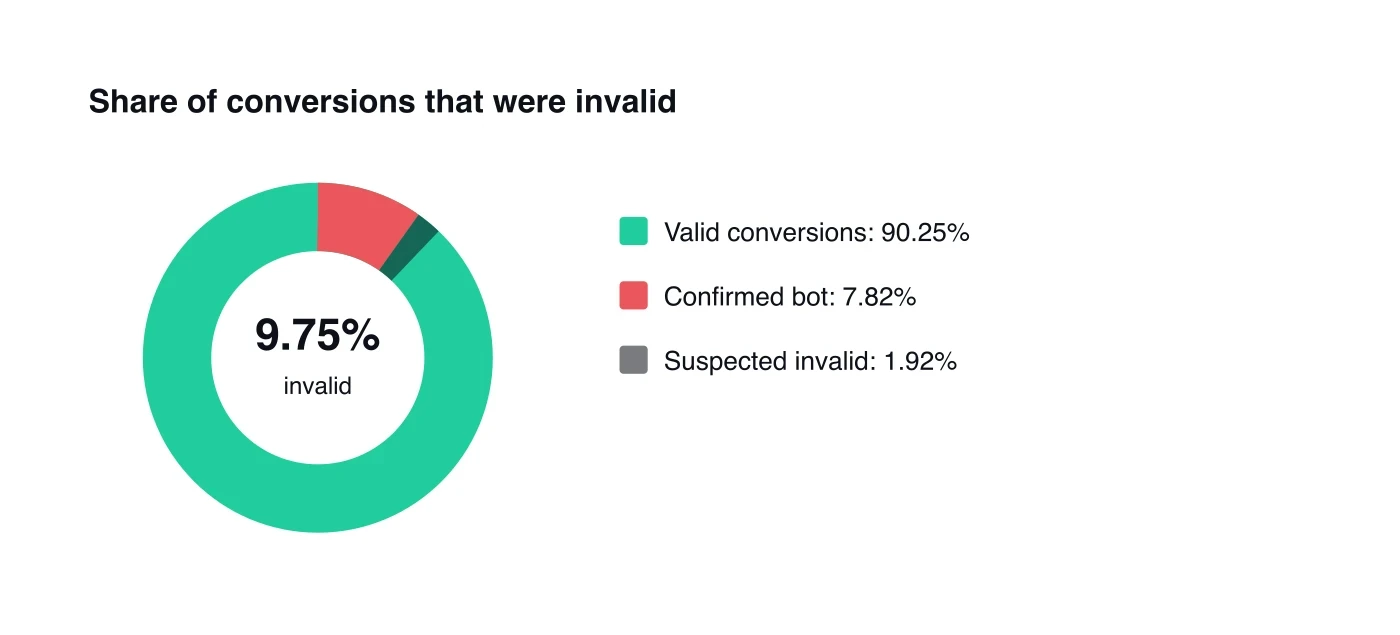
Source: fraud0, Unmasking the Shadows 2025
Does data residency really matter?
If you advertise in the EU, yes, and it's easy to overlook in a feature checklist. Click fraud protection inspects your traffic data, which can include personal data under GDPR. Where that data is stored and processed becomes a compliance question, not just a technical detail. For European advertisers, EU-resident, GDPR-aligned processing isn't a nice-to-have.
Most buyers compare detection features and forget that the tool itself becomes a data processor in your stack. For example, a protection tool that ships your traffic data to a jurisdiction your DPO hasn't cleared can create a compliance problem while solving a fraud one. For EU and DACH advertisers, data residency belongs on the same shortlist as detection depth, not in the fine print.
How much should you expect to pay?
Pricing in this category swings widely, from low monthly self-serve plans to enterprise floors that can reach tens of thousands a year. Transparent, published pricing is itself a useful signal: it usually means self-serve onboarding and no long procurement cycle. Conversely, tools that hide every number behind "contact sales" tend to carry enterprise minimums that don't fit a smaller advertiser.
Match the spend to the stakes. For instance, if you're running a modest budget, a high enterprise floor rarely pays back. If you're spending heavily across channels, however, the depth and recovery support are usually worth more than the lowest sticker price. The right answer is the tool whose scope matches your exposure, which is exactly what the channel and conversion data above helps you size.
What are the limits of click fraud protection?
This is the part most buyer's guides skip, and it's the most important. No click fraud protection tool blocks 100% of invalid traffic, and any vendor implying otherwise is overselling. The reason is structural, not a flaw in any one product. Exclusion works by recognizing sources you've already scored as bad. A brand-new bot, on its very first click from a previously unseen source, has no history to match against. By definition, it can't be pre-blocked. Good detection catches it fast and stops the second click, but that first one still costs you. Some invalid traffic will always slip through.
No click fraud protection blocks 100% of invalid traffic, because a brand-new bot's first click has no history to match against and can't be pre-blocked. In 2025, fraud0's Unmasking the Shadows report still found 21.3% of onsite traffic invalid (search-engine crawlers excluded), which is why prevention pairs with evidence-based refunds rather than replacing them.
This is exactly why protection and refunds are two halves of one strategy, not competing options:
Prevention cuts the future leak by excluding sources you've already scored as invalid.
Recovery reclaims the residual that detection can't pre-block, plus the budget already spent before you started protecting.
Evidence ties the two together, because the same onsite record that powers exclusion also documents a refund claim.
A tool sold purely as "blocking" leaves that recovery on the table. The honest framing pairs "reduce" with "recover" every time.
In our experience supporting advertisers, the teams that get the most from these tools treat the residual as recoverable, not as an unavoidable loss. They use the same onsite detection that powers exclusion to also document the invalid activity, then pursue recovery where the evidence supports it. The detection does double duty. One layer of data, two ways to get value from it.
A note on honesty about refunds, too. Recovery is evidence-based and never guaranteed. Outcomes depend on what invalid activity is actually detected and on each platform's review process, and platforms like Google typically return money as account credit toward future spend rather than cash. We're specific about that because over-promising helps no one.
How does onsite detection complement platform filtering?
Onsite, first-party detection complements platform filtering by seeing what the platform can't: behavior after the click. In 2025, fraud0's Unmasking the Shadows report found invalid users were markedly shallower than real ones on average, fewer page views and far shorter sessions, post-click signals that exist only on your own site. Platform filtering ends at the click; onsite detection begins where the platform's view goes dark.
Think of it as two vantage points on the same traffic. First, the platform sees the click, the IP, and some pre-click signals, then filters the obvious invalid activity. However, once the visitor lands on your site, the platform can't watch what happens next. Onsite detection picks up there, reading how the visitor actually behaves, which is where bots most reliably give themselves away.
Why isn't platform filtering enough on its own?
Platform filtering is valuable, but it's one vantage point, and it can't see your site. In 2025, fraud0's Unmasking the Shadows report found 21.3% of onsite traffic invalid (search-engine crawlers excluded). That figure is the gap onsite detection closes. Pairing the two narrows the blind spot rather than trusting either alone.
The practical payoff is twofold. First, you catch more invalid activity, because two layers see more than one. Second, the onsite layer produces the detailed, first-party record a refund claim needs, logged at the moment the activity happened rather than reconstructed later from a platform summary. That same record feeds your exclusion lists. In other words, detection, exclusion, and evidence all come from one source.
Protect Meta, Microsoft, and TikTok campaigns shows how this cross-channel picture plays out beyond Google, where the platform controls and the traffic both behave differently.
Where does fraud0 fit in this comparison?
fraud0 is the onsite-detection-plus-recovery option in this category, built advertiser-side and EU/GDPR-resident. In 2025, our Unmasking the Shadows report analyzed 1.2 billion onsite sessions and found 21.3% of onsite traffic invalid (search-engine crawlers excluded), the first-party data behind the approach. We pair onsite, first-party detection with evidence-based ad-spend recovery, rather than offering click-blocking alone.
In plain terms, here's the honest fit. For example, if you want a simple IP blocker for one platform, lighter tools exist and may suit you. If your waste hides in conversions and analytics, your spend spans several channels, you operate under GDPR, or you want the same detection to also support refund claims, however, that's the gap fraud0 was built for. In short, we make wasted ad spend visible through onsite detection, then support recovery where invalid activity is found.
We won't pretend it blocks everything, because nothing does. What we can do is reduce the leak going forward and help you recover the residual and the past waste, with the honest caveat that refund outcomes depend on detected invalid activity and platform review. The ad-spend refund guide covers that recovery side in full.